
What a Truly Connected Mobile Experience Looks Like — and Why Most FSM Apps Fall Short
A dispatcher at a commercial HVAC contractor in the Southeast got a call from her own accounting department two Fridays ago, about a job that had closed four days earlier. Nobody could explain where the labor hours had gone. The technician swore he had logged everything—and indeed he had. It just hadn’t arrived.
That kind of call is routine at commercial field service and construction companies running $30 million to $250 million in revenue on Sage 100, tired of being told a slicker mobile app would fix what a disconnected accounting system was still chasing down by hand.
What most of them are actually looking for is a Sage 100 native integration field service software, not another mobile app promising to catch up eventually. The technician's tablet looked modern. Work order management looked clean. But something between the two didn’t hold.
By the time this piece is finished, you will know exactly where that Friday afternoon call came from, and why it has almost nothing to do with how good the mobile app looks.
Why Doesn't Your Field Service App Talk to Your Accounting System?
Because most of them were never built to. A mobile field service app and an enterprise resource planning (ERP) system like Sage 100 are typically built by two different companies, for two different purposes, and connected after the fact through a file export, a scheduled sync, or a third-party bridge that somebody on staff has to babysit.
The app does its job. The accounting system does its job. The handoff between them is where a service ticket goes to die.
A 2022 study of 106 construction sites examined a version of the same failure: researchers testing electronic devices for closing information gaps found that putting field data onto a tablet did nothing, on its own, to close the communication gaps already slowing project progress. The gap closed only once those devices connected into a shared flow of information running underneath them. A tablet is a faster clipboard. But on its own, it offers no field-to-ledger connectivity.
Here's a rule of thumb you can follow: if a piece of field data has to be re-typed by a human being anywhere between the truck and the ledger, that data point is a liability, not an asset. Ask any field service management (FSM) vendor how many hands touch a service ticket before it reaches accounting. Zero is the only acceptable number.
The industry did not stumble into this problem. It built two separate products and left the connecting to somebody else.
Native Integration vs. Middleware: What's Actually Different Under the Hood
The difference between a native integration and a middleware bridge is not a matter of degree. It is a matter of architecture, and the two produce entirely different books at the end of the month.
The Middleware Model
Most commercial FSM platforms—including, and perhaps especially, the polished, well-funded ones—are genuinely strong at dispatch and scheduling. What breaks is the layer underneath. These platforms connect to an ERP system through an API (application programming interface) or a scheduled file sync, and that connection works exactly—until it doesn’t.
A Sage 100 patch, a new field in the FSM database, a sync job that times out overnight: any of it can sever the bridge, and somebody has to find the break and fix it before the next invoice run goes out. Ascent's reporting on this exact pattern traces how a job closing on a Tuesday can sit unposted until Thursday, waiting for three separate systems to agree with each other.

The Native Model
AutomatedService, Ascent's platform for companies already on Sage 100, lives inside Sage 100 at the source code level. There is no bridge to maintain, because there is no second system to bridge to. A labor entry, a parts pull, an invoice: each one posts through real-time data synchronization to the same database Sage 100 already runs on, the moment it happens.
Ascent Business Solutions builds its platforms from the accounting layer outward. No middleware. No manual reconciliation. One source of truth.
What Does a Field Ticket Actually Touch When It's Truly Connected?
Follow one ticket through. A technician logs labor and parts on his tablet. In a genuinely connected system, that single entry updates truck inventory in real time, assigns cost to the correct job for job costing, generates the invoice, posts revenue to general ledger accounting, and, for a technician whose hours feed payroll, produces his time card. Five outcomes. One entry. Nobody retypes anything along the way.
McKinsey's own research into field labor found that technicians waste up to 40 percent of the workday on tasks that add no value at all, timesheets chief among them, with two to three additional hours lost to idle time on top. That is what happens when a human being sits in the middle of the connection between field and ledger, across an entire fleet, every day.
How Ascent's OSP Mobile Platform Keeps the Truck and the Ledger in Sync
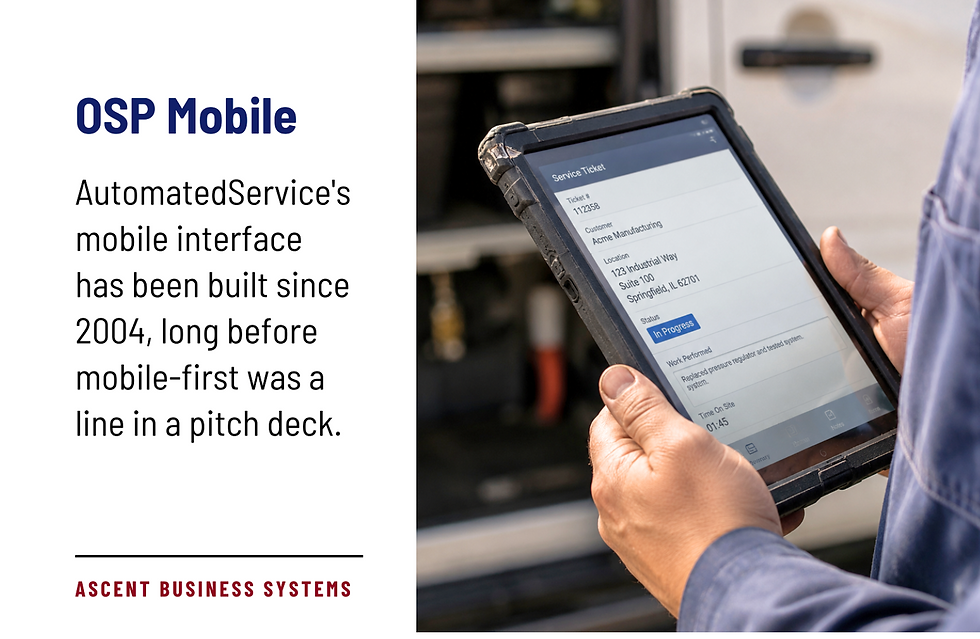
OSP, the mobile interface built into AutomatedService, has been in continuous development since 2004, long before “mobile-first” was a line in a pitch deck.
What OSP Does in the Field
A technician logs labor with a keyboard shortcut for travel time or standard time. He pulls parts from truck inventory, flags a purchased item, or logs a transfer from another technician he met at lunch, and the system tracks the distinction.
If a sales order already specified the parts for the job, they populate on his tablet automatically; he only confirms quantities. Field invoices calculate the correct tax jurisdiction and customer discount without anyone checking behind him, across every state and jurisdiction the company operates in.
One entry. Every ledger. Nothing re-typed.
What Happens the Moment the Job Closes
The technician's time card generates from the same service ticket he already filled out, ready for one-button submission straight to Sage 100 payroll. Full job history for every site lives on the tablet too, so when a customer disputes a charge, the technician can pull up exactly what happened on the last visit, and by whom, on the spot.
What This Means for First-Time Fix Rate and Mean-Time-to-Repair
A technician who can see a site's complete job history and current parts availability before he starts working fixes more problems on the first visit, and it takes him less time to do it. Research from adjacent service industries supports the general mechanism, even in studies that never touched field service software directly.
A 2025 study of two automotive repair centers found that structured process visibility and real-time tracking cut rework rates from 7.8 percent to 2.6 percent and lifted technician efficiency from 89 percent to over 105 percent.
Data you can trust is data you can act on.
Ascent does not publish a universal first-time fix rate or mean-time-to-repair benchmark of its own; those numbers depend on the fleet, the vertical, and the technician's tenure. What the research above establishes is the mechanism: visibility drives the outcome. A mobile platform that reflects what is actually in the truck, and what happened on the last visit, is the precondition for that visibility. A platform that does not is asking its technicians to fix things blind.
Choosing a Mobile FSM Strategy That Doesn't Create More Reconciliation Work
An enterprise mobile strategy built around adding one more app to the stack tends to backfire. A recent examination of workplace software sprawl found employees increasingly navigating separate systems, repeating tasks, and hunting for information across applications each sold as a productivity gain. Field service runs on the same math. A new mobile app bolted onto a stack that does not already share data adds a system. It does not add information.
Before adopting or renewing a mobile FSM strategy, put these questions to the vendor directly:
Does field data post to accounting automatically, or does it wait on a sync job somebody has to trigger or monitor?
How many separate logins does a single job touch between dispatch and invoice?
Who is responsible for fixing the connection when one system updates and the other does not?
What does the mobile app actually do the moment a technician marks a job complete?
If any answer requires “we’ll get back to you,” you have found the gap before you signed the contract instead of after.
A The dispatcher's Friday call, it turned out, traced back to a sync job that had failed silently two days earlier. Nobody had been notified.
The labor hours existed the whole time, sitting in a queue somewhere between the mobile app and the accounting system, waiting for a human being to notice they had never crossed over. They eventually did. The invoice went out a week late. The technician got paid on time only because someone in payroll caught the gap by hand and fixed it that same night, working late.
That is what an unconnected mobile platform actually costs. Not one dramatic failure, but a standing tax paid in small, invisible increments, once per job, every day, for as long as the architecture stays broken. It compounds across every division, every month it goes unfixed.
Ascent has spent thirty-eight years building field service software from the accounting layer out, on the conviction that back-office integration and field service were never supposed to be two stories. Most vendors will tell you their platform connects to Sage 100.
Ask to see a technician close a job and watch it land in the ledger before he's back in the truck.
Comments